
Positive Grid BIAS FX Metal Tones (and more!)
Are you struggling with dialing in a metal tone using BIAS FX? (here’s where you admit you have a problem so we can fix it!)
In this post, I’m going to give you my exact amp, EQ, and effects settings for my metal tones using Positive Grid’s BIAS FX plugin.
In fact, I’m going to give you my settings for 2 albums I recorded using BIAS FX, and several other tones.
Go grab your guitar, pull up your DAW and load BIAS FX into a new tracks…we’re going to get to work!
What Is BIAS FX?
If you already own or are at least familiar with Positive Grid BIAS FX, then you can skip this section and start with the 92 Treadplate tone below.
But if you’re a newbie to BIAS FX, or the world of amp VSTs and plugins in general, I want to give you a short rundown…
BIAS FX is a virtual amp modeling simulator, also called a plugin or amp sims. These amp simulators are designed the mimic the sound, tone, and feel (although that last one is a stretch) of a real amp.
BIAS FX contains a generous suite of amps, and also comes with cabinet, speaker, and effects simulators. So you pretty much have an entire rig with multiple tones at the mercy of your keyboard.
Amp sims used to suck! Big time! But over the years, technology has come a long way. And in my opinion, Positive Grid is one of the leader’s of this bunch.
Amp Sims for Newbies (Video)
If amp sims and plugins is completely uncharted territory for you, then I have a video on how to use plugins…this will help you get started:
BIAS FX 92 Treadplate
The 92 Treadplate amp sim was hands-down the reason I decided to purchase the the BIAS FX desktop pro package. I was looking for a good Mesa tone and at that point, and the other amp sims I was using just wasn’t cutting it.
***Oh, I used the ’92 Treadplate for my 2nd studio album Heavy Metal Workout (more on that below!)…
Now, I’m not saying the 92 Treadplate sounds and feels like a playing through a real Mesa Boogie Dual Rectifier (this is the amp it’s modeled after). In all reality it probably doesn’t.
But I personally don’t care about replicating a sound. If it’s in the ballpark range and the recorded is tight, and more importantly, if it sits well in the mix, then I’m happy.
So don’t get caught up in the ‘it doesn’t sound like a real amp’ syndrome. The question you should ask it does it sound good, period!
I’m going to spend a little more time on the 92 Treadplate because it has been my go-to BIAS FX amp out of the many metal amps available in BIAS FX.
The ’92 Treadplate will replicate metal tones from bands like:
- Megadeth
- Metallica
- Slayer
- Testament
- Exodus
- Overkill
92 Treaplate Video
92 Treadplate Settings
Below are my basic metal rhythm settings. In fact, my settings are similar across the board. I don’t generally make huge variations.
I cut the bass back to give room for the bass guitar and kick drum. Mids are cut a little but not overdone. On this particular amp model (BIAS FX Treadplate or any Mesa sim), I end up cutting the presence back quite a bit.
Amp Settings

- Gain: 6.5
- Bass: 4.5
- Mid: 4.5
- Treble: 6
- Presence: 3.5
- Master: 5
Cab and Mic Settings
- 4×12 Treadplate cabinet with SM57 mic sim

- 4×12 Treadplate cabinet with C414 mic sim
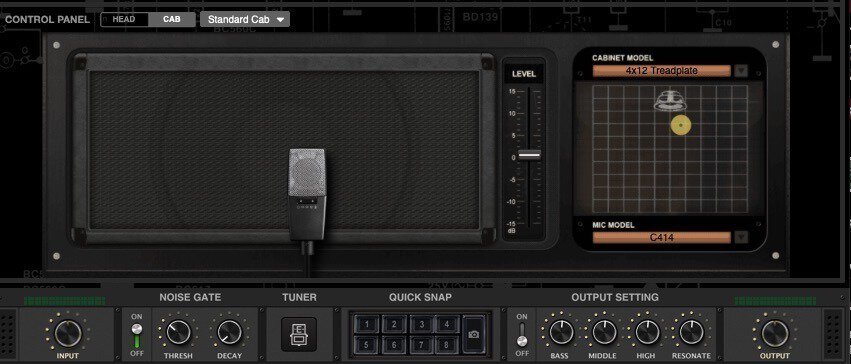
**the 2 cabs/mics are explained below…
Effects Used
- Noise gate
- Tube screamer
More on Cabs and Mics
I encourage you to play around with the mic placements. This is where you’ll get the most variations of metal tones. Also try different cabinets and see how that sounds.
In fact, I use the SM57 mic for one track and the C414 for the other (I generally record two rhythm tracks and hard pan each).
And I sometimes use the Orange cab with the SM57 for leads…that really allows your guitar solos to stand out and cut through the mix!
More on Effects and Leads
I don’t typically use a lot of effects for rhythms other than a noise gate and tube screamer sim. For leads, I’ll throw in delay, and now and then a little reverb. But there’s a ton of effects you can mess around with in BIAS FX.
I wanted to touch on my leads using 92 Treadplate Mesa Dual sim.
My settings are the same as my rhythms other than a slight boost on the a few things. I boost the gain to about 7-8, bass to 5 or so, and mids are boosted to a little over 6. And I’ll add the delay.
**For effects and leads, this applies to everything (so I won’t replicate this on the amps below). But just because I take the simple way on these things doesn’t mean you have to!
Album Using BIAS FX 92 Treadplate

I used the BIAS FX ’92 Treadplate amp sim for my album Heavy Metal Workout.
This is an instrumental classic metal style album with lot of riffing and chunky rhythms, which the 92 Treadplate worked perfectly for!
Read more about this album here.
BIAS FX Insane Satan
After recording my first album with the ’92 Treadplate I had decided to continue using BIAS FX for another album. But I wanted to find a different tone…a more darker tone!
That ended up being the BIAS FX Insane Satan amp sim.
For starters, I’m not a big fan of using anything named ‘Satan‘ but I decided to put any superstition aside and just go with what I thought would fit the album.
I’m fairly certain the Insane Satan is modeled after the Randall Satan (if I weren’t so lazy I would just look that up, and I’m pretty sure that I have before but forgot!).
The Insane Satan will give you metal tones from bands like:
- Arch Enemy
- Ensiferum
- Dark Tranquility
- At the Gates
- Insomnium
Insane Satan Video
Insane Satan Settings
Below are my Insane Satan amp settings. It’s important to note that I was looking for a darker tone, but also very tight because there’s a lot of fast alternate picking on the album I used this tone for.
You may find these settings to be a melodic death metal tone. And there’s a tremendous focus on the cabinets for these tones, which I’ll go into more below.
Amp Settings

- Gain: 6.7 – This amp sim doesn’t require a ton of gain. It’s designed as a super high gain amp, so you actually get more clarity with the back backed off.
- Bass: 5.4 – I felt the Insane Satan needed a slight boost in bottom end, but I didn’t overdo it.
- Middle: 5.3 – I normally cut my mids, but this amp has a sweet spot with the mids slightly boosted.
- Treble: 6.5 – The treble setting was standard for me, although slightly back off from my normal 7.
- Presence: 4.7 – This amp sounds best with the presence up the middle, slightly backed off.
- Master: 5 – Up the middle for the master volume is par for the course. I keep my settings simple!
Cab and Mic Settings
- 4×12 ENG cabinet with SM57 mic sim

- 4×12 Thrasher cabinet with SM57 mic sim

Effects Used
- Noise gate
- Tube screamer