
How to Eliminate String Noise and Play Tighter Metal Guitar Riffs and Solos
One of the biggest problems metal guitar players face is unwanted string noise. Whether you’re trying to lock in tighter riffs or hold out that one sustained note and really milk it, extra noise from surrounding strings can ruin your tone and clarity.
The good news? You can fix this fast once you know what’s causing it.
In this lesson, you’ll learn three simple methods to eliminate unwanted string noise so your riffs and leads sound clean, tight, and professional:
- Fret-hand muting: Use your fretting fingers to lightly touch and mute the strings around the one you’re playing. This keeps stray strings from ringing out and cleans up your overall sound.
- Palm muting control: Use the edge of your picking hand not just for chugging riffs, but as a tool to control resonance and tighten up your tone.
- Picking-hand muting for leads: When you’re bending or sustaining a note, hover your thumb and index finger over the neighboring strings to silence them. It feels weird at first, but it’s a total game-changer for clean solos.
👇 Watch the full video below to see exactly how to apply each of these techniques in real time and start playing cleaner, tighter metal guitar today.
🎸 Method 1: Fret-Hand Muting – Your First Line of Defense Against String Noise
One of the best ways to eliminate string noise on electric or metal guitar is by using your fret-hand to control the strings around the one you’re playing.
Let’s start simple. Picture this: you’re picking a note on the A string, 7th fret, while lightly palm-muting the open low E. The noise you hear usually isn’t from the note itself; it’s from the surrounding strings that start vibrating on their own.
Here’s what you do:
Use the same finger that’s fretting the note (your first finger in this case) to lightly rest on the strings above and below that note. You’re not pressing down. You’re just letting that finger touch or hover so those strings stay quiet.
- The D string (just above the A) can start ringing, so let your first finger rest gently on top of it.
- The low E string (just below the A) can also hum from sympathetic vibration. Keep part of that same finger touching it as well.
If you picked those muted strings, you’d hear a dull thump instead of a note, and that’s exactly what you want. When you hit only your fretted note, the rest of the guitar stays silent.
Now, when you’re using your second or third finger to fret notes, you’ll naturally lose that contact. In those cases, bring your first finger over just enough to mute the lower string (like the open E). It becomes a team effort between your fretting fingers to keep everything tight and controlled.
⚙️ Why This Feels Awkward at First
If this feels strange, that’s totally normal.
When we first learn guitar, we’re taught to avoid touching other strings so open chords ring cleanly. But in metal and high-gain playing, it’s the complete opposite. We actually want to mute every string we’re not playing so only the notes we pick punch through.
Instead of arching your fingers straight up like chord shapes, start angling them slightly across the fretboard so they rest on nearby strings. That small change rewires your muscle memory from “let everything ring” to “control every vibration.”
It’ll take a little time to feel natural, but once it does, you’ll notice your metal riffs, power chords, and palm-muted rhythms instantly sound tighter and cleaner.
Fret-hand muting is your first line of defense, and it’s one of the easiest ways to play tighter metal guitar riffs without changing your tone or gear.
⚡ Method 2: Palm Muting Control – Tighten Your Riffs Without Killing the Tone

The second method to eliminate string noise is probably the easiest, and it’s one you already know: palm muting.
Now, you might be thinking, “Well, duh, Jason… I already know palm muting helps with noise.”
True, but there’s more to it than just resting your hand on the strings.
When I’m playing a simple riff, sometimes it sounds tight and controlled, and other times it opens up and breathes a little more. The difference? When and how much I’m palm-muting.
Here’s the key idea:
👉 You don’t have to palm-mute every note.
Use light, selective palm muting to control resonance only where you need it.
- If you want a note or chord to hit hard and punchy, keep your palm down and let the note pop tight.
- If you want a little more openness or sustain, lift your palm slightly and let it ring for just a split second.
This back-and-forth control, tight, then open, then tight again; that’s what gives your riffs life and groove while keeping the unwanted string noise under control.
🎸 Use Palm Muting as a Creative Tool
Palm muting isn’t just a noise-reduction trick. It’s one of the most expressive tools in metal rhythm guitar.
Experiment with it. Don’t worry about doing it “exactly like the original riff.”
Sure, learn other people’s songs (and mine, of course 😎), but start using these ideas to write your own riffs. The best riff you’ll ever play is the one you write.
By combining Method 1 (fret-hand muting) with Method 2 (palm muting control), you’ve already built a powerful foundation for clean, tight metal rhythm playing, even under high gain.
🤘 Method 3: Picking-Hand Muting for Leads and Bends
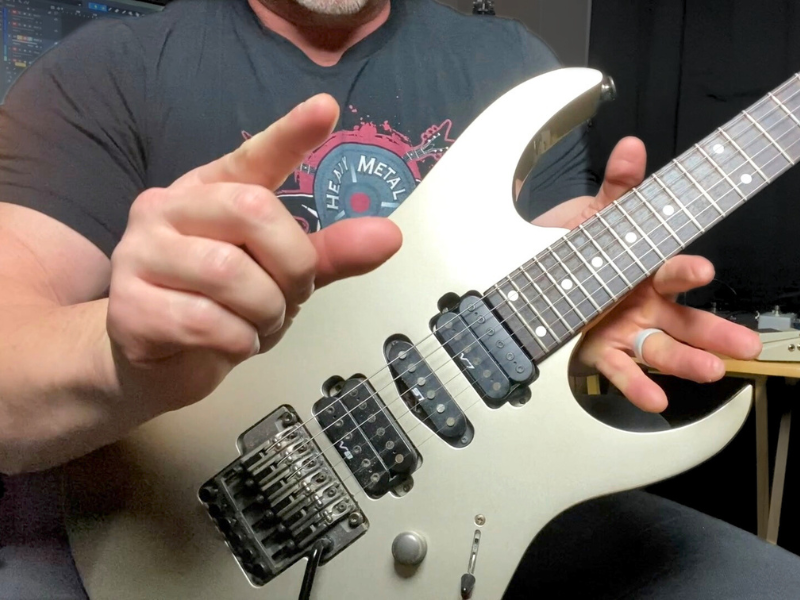
Now, for the third method to eliminate string noise, and this one’s a game-changer, especially when it comes to guitar solos and lead playing.
This is the area where a lot of players (myself included, back in the day) get frustrated. You’re bending a note, adding some nice vibrato, really letting that tone sing… but then you hear this mess of other strings ringing out behind it. It kills the moment.
That noise usually comes from the surrounding strings, not the one you’re bending. So, to control that, you can use your picking hand to lightly mute those strings while your note rings clean and strong.
Here’s how it works:
- As you bend a note, use your thumb and first finger of your picking hand to hover over the strings directly above and below the one you’re bending.
- You’re not pressing. You’re just resting lightly enough to stop those other strings from vibrating.
- For example, if you’re bending on the B string, 15th fret, your thumb can re