POD HD500 Metal Tones
Are you looking for some new POD HD500 metal tones that aren’t fizzy and sound close to a real amp?
In this post, I’m going to give you my exact amp settings and show you how to create some killer metal guitar tones with your POD HD500.
So go grab your guitar and get ready to dial in some new metal tones!
Below you’ll find the sections for each HD500 metal amp (I’ve got some extra tones for you too)…
HD500 Treadplate Tone
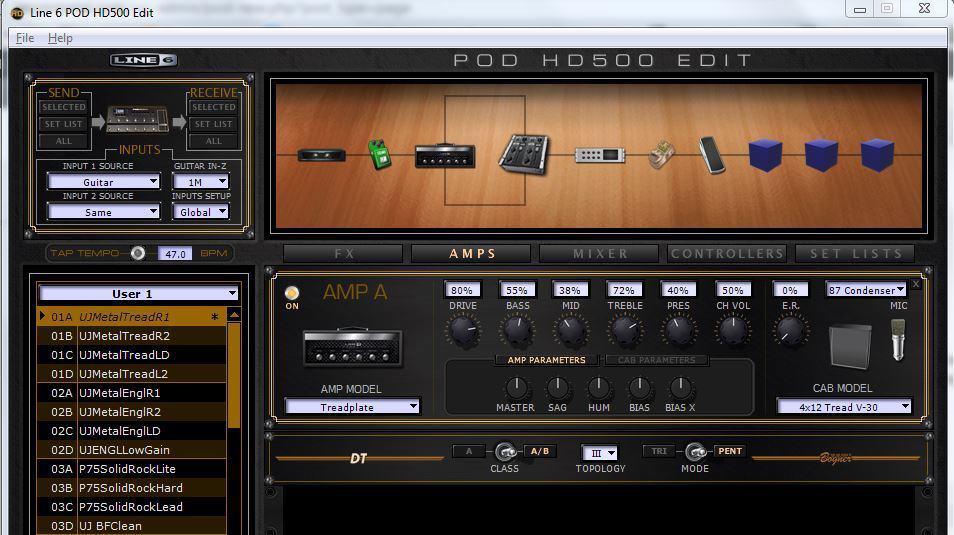
The Line 6 HD500 Treadplate amp is based on the Mesa Boogie Dual Rectifier amp (probably more accurately the Mesa half stack). I’d be willing to say this is Line 6’s most popular amp model for all of their amp modeling units for both rock and metal tones.
This is probably due to two things:
- The Mesa Dual Rectifier amp is one of the most sought after tones for hard rock and heavy metal music and…
- I think Line 6 nailed it with their Treadplate amp modeled after the Mesa Dual. Even with their earlier units such as the POD XT Live (which I have a few videos on as well), the Treadplate seems to be the amp model most rock and metal guitarists use.
This is the first video I made for the Line 6 POD HD500, and I made this shortly after upgrading from the POD XT Live to the HD500.
Since I had used the Treadplate as my go-to amp model with the XT Live I immediately started programming my settings for the Treadplate when I brought home my HD500.
Even though there was a learning curve for me with the HD500, it didn’t take long to program a solid metal tone with the Treadplate. Check it out below…
HD500 Treadplate Video
**Compare this the HD500 Treadplate to the Positive Grid BIAS Amp 2 Treadplate (using the Celestion IRs) in this post: BIAS Amp 2 Metal Tones
Treadplate Settings
The settings below are slightly different from the settings I used in the video. I made minor changes to my EQ settings, mic, and I eliminated the Compressor/Sustainer (I found the tone to be clearer without these).
Here’s my Treadplate settings that you can use for your HD500…
Amp and Cabinet Settings:
- Amp: Treadplate
- Cabinet: 4×12 Tread V-30
- Mic: 87 condenser (67 mic for the other panned rhythm)
- Drive: 80
- Bass: 55
- Mid: 38
- Treble: 72
- Presence: 40
- Channel Volume: 50
Pedals and Effects:
- Noise Gate: Decay 20, Thresh 60
- Screamer: Bass 55, Tone 70, Treble 65, Drive 20, Output 80
- Parametric EQ: Lows 50, Highs 50, Frequency 60, Q 50, Gain 40
- Delay: Settings vary based on the song and used mainly on leads
**These are my rhythms settings for the HD500 Treadplate amp. I usually record two rhythm tracks for metal and hard pan them both. I use the Neumann U 87 mic sim for the guitar track pan left and the 67 mic for the one I pan right.
And I also use the 87 mic for lead tracks. I use various delay effects and settings depending on the song, and I normally only use delays for my lead guitar tracks. If you see any settings I did not post then that just means I didn’t change anything.
HD500 Angel FBALL Metal Tone

The Line 6 HD500 Angel FBALL is based on ENGL Fireball amp. These German-made amps (ENGL) have an extremely distinct tone and feel.
They’re widely used by melodic death metal, Gothic metal, symphonic metal, and power metal bands (all of which I love!). They deliver a ton of gain without lacking clarity.
That being said, I was eager to see what metal tones I could dial in using the Angel FBALL.
At first, I was battling between the Treadplate and Angel FBALL, and a fierce battle this! Both had proven to deliver the best HD500 metal tones (in my opinion…the other models are decent but do not hold a candle to these two).
Here’s my Angel FBALL metal tone…
HD500 Angel FBALL Video
Angel FBALL Settings
The settings below are my most recent HD500 Angel FBALL settings and are slightly different from the one’s you hear in the video above (though you may not be able to tell).
The changes aren’t substantial but I’ve found that I like the FBALL tones better with boosted mids rather than the typical scooped mids you hear in many metal songs.
Amp and Cabinet Settings:
- Amp: Angel FBALL
- Cabinet: 4X12 XXL V-30
- Mic: 57 off axis (57 on axis mic for the other panned rhythm)
- Drive: 90
- Bass: 50
- Mid: 55
- Treble: 72
- Presence: 70
- Channel Volume: 50
Pedals and Effects:
- Screamer: Bass 55, Tone 70, Treble 65, Drive 20, Output 80
- Parametric EQ: Lows 50, Highs 50, Frequency 60, Q 50, Gain 40
- Delay: Settings vary based on the song and used mainly on leads
**The overdrive, parametric EQ, and delay for leads for the same that I use for Treadplate (or at least similar)…this is the case for most of my metal tones.

First Metal Album Recorded Using the POD HD500

Well, I don’t know if this is the FIRST metal album using the POD HD500 for guitar tones, but it was used on my first album!
I released Apocalyptic Dreams in 2013. This is an instrumental metal album with a classic metal style. There’s plenty of riffs and chunky palm muting, so I needed that clarity and needed a tight guitar tone.
At the time, the HD500 was what I had to work with. And having my studio in our small apartment back then, it was a feasible option.
What tone did I use for Apocalyptic Dreams?
You guess it…the Angel FBALL (same settings and all that you read about above!).
You can buy/listen to Apocalyptic Dreams below…
Listen to Apocalyptic Dreams
HD500 Brit J800 Hard Rock Tone
I like Marshall amps but I don’t love them. Yes, I know, that’s total blasphemy.
They’re great for hard rock tones, and of course there are a few old school metal bands that use or have used them (Megadeth and Slayer use Marshalls, and Hetfield had a modded Marshall he used for Metallica’s first two albums).
But I’ve always been more into the tones from ENGL, 5150/6505, and a few other amps for metal. However, when it comes to rock or hard rock tones, it’s tough to beat a Marshall.
It was no surprise that I didn’t care much for the Line 6 POD HD500 Brit J800 at first. However, for some reason I decided to spend some time tweaking the settings.
When I recorded the song that you’ll hear in the video below, I was blown away by the overall mix and how good the Brit J800 sounded!
There was a trick I used, and once I learned this trick, I’ve used it on every single song and album I’ve ever released.
It’s typical for me to record two rhythm guitar tracks and hard pan each one. But this time, I made some subtle changes to the second rhythm guitar tracks. Nothing major, just moved the EQ here and there, and maybe the mic placement.
Once I did that, the two guitars sounded like the Heavens opening up in my studio.
HD500 Brit J800 Video
**Compare the HD500 J800 to the BIAS FX Snake’s Lead tones in this post: BIAS FX Metal and Rock Tones
Brit J800 Settings
My Brit J800 amp settings below are for one rhythm track (the one panned hard left).
I do give you the mic I used for the second rhythm guitar. But you can mess around with the EQ to make more changes if you want (mainly to your mids and highs).
Amp and Cabinet Settings:
- Amp: Brit J800
- Cabinet: 4×12 Brit 75
- Mic: 409 mic (57 mic on axis for the other panned rhythm)
- Drive: 90
- Bass: 60
- Mid: 60
- Treble: 72
- Presence: 40
- Channel Volume: 50
Pedals and Effects:
- Noise Gate: Decay 20, Thresh 60
- Screamer: Bass 55, Tone 70, Treble 65, Drive 50, Output 80
- Parametric EQ: Lows 50, Highs 50, Frequency 60, Q 50, Gain 40
- Delay: Mostly leads, some rhythms and the settings will vary
HD500 SOLO 100 Rock/Metal Tone (Crunch and Overdrive)
I’m not too familiar with the actual Soldano amps. And I’ve never been a fan of the processors or amp simulators that have modeled this amp.
I decided to shoot a video with the HD500 SOLO 100 amp out of curiosity. I just wanted to hear it with my style of playing, and in a full mix.
I was pleasantly surprised with this amp, but not so much for the type of metal I play. It’s more of a rock or hard rock tone (that’s why I’m calling this the SOLO 100 ‘Rock’ instead of Metal in the title).
So here it is…my curiosity video!
HD500 SOLO 100 Video
SOLO 100 Settings
In the video, I broke down the amp tones into four parts:
- SOLO Crunch 1
- SOLO Crunch 2
- SOLO Crunch 3
- SOLO Lead (Overdrive)
As the settings are similar between all of these, I’m listing one set below. The core change for the Crunch, or the rhythm patches is the different cabinets and mics used (which are listed below).
Amp and Cabinet Settings:
- Amp: SOLO 100 (Crunch and Overdrive)
- Cabinet and Mic 1: 4×12 Brit 75 with SM57 mic off axis
- Cabinet and Mic 2: 4×12 Greenback 25 with 409 mic
- Cabinet and Mic 3: 4×12 Blackback 30 with 409 mic
- Drive: 71
- Bass: 60
- Mid: 71
- Treble: 75
- Presence: 38
- Channel Volume: 50
Pedals and Effects:
- Noise Gate: Decay 20, Thresh 60
- Screamer: Bass 55, Tone 70, Treble 65, Drive 50, Output 80
- Parametric EQ: Lows 50, Highs 50, Frequency 80, Q 60, Gain 40
- Delay: Mostly leads, some rhythms and the settings will vary
**Cabinet and Mic 3 was used on both the Crunch 3 and Overdrive (lead) tones
HD500 BF Double VIB Clean Tone
This is my absolute favorite clean tone among all amp modelers, effects processors, and software (VST) amp sims…
The HD500 BF Double VIB (such a long name, eh??!).
I assume this amp is modeled after the Fender Blackface Deluxe, or maybe one of the Fender Reverb editions. I’m not certain.
And I will not attempt to compare the HD500BF Double VIB to a real Fender tube amp (you tone snobs would put out a hit on me if I did that!). But to my ears, this amp model is a win.
It also fits perfectly with the many HD500 effects, especially the delays and reverbs. In particular, you get some astounding ambient tones using the HD500 Particle Verb effects (I’ve yet to find anything that replicates this sound, which is why I still own my HD500 unit).
Is this a metal tone? No, but it’s a killer clean tone that would fit nicely in any metal song, like an intro, outro, or breakdown during the song.
HD500 BF Double VIB Video
**There’s also some killer ambient tones I came up with using Positive Grid’s BIAS FX plugin in this post: BIAS FX Clean and Ambient Tones
BF Double VID Settings
You can dial in the exact tones with the settings below. But I do encourage you to mess around with the settings. You can also add an overdrive in front of the amp to get some cool tones.
The effects are also something I suggest you spend adequate time on. There’s some crazy ambient sounds you can get mixing the different reverbs and delays. Just have fun with this one!
Amp and Cabinet Settings:
- Amp: BF Double